Financial Data From QuickBooks to ShopXpert
Bring the financial and master records your operations team needs into ShopXpert.
- Customer receipts and customer credits
- Tax codes
- Employees, customers, suppliers, and products

Connect ShopXpert manufacturing operations with QuickBooks accounting so invoices, purchase orders, customers, suppliers, products, payments, and job data move through a controlled workflow.

ShopXpert manages the daily operational workflow of your manufacturing business, while QuickBooks continues to support accounting and financial activity. The integration connects the two systems with a clear division of responsibility.
Bring the financial and master records your operations team needs into ShopXpert.
Send new operational records from ShopXpert into the accounting workflow.
The field-mapping diagram shows the operational and financial records that move between the two platforms, giving teams a clear picture of where data originates and where it is used.
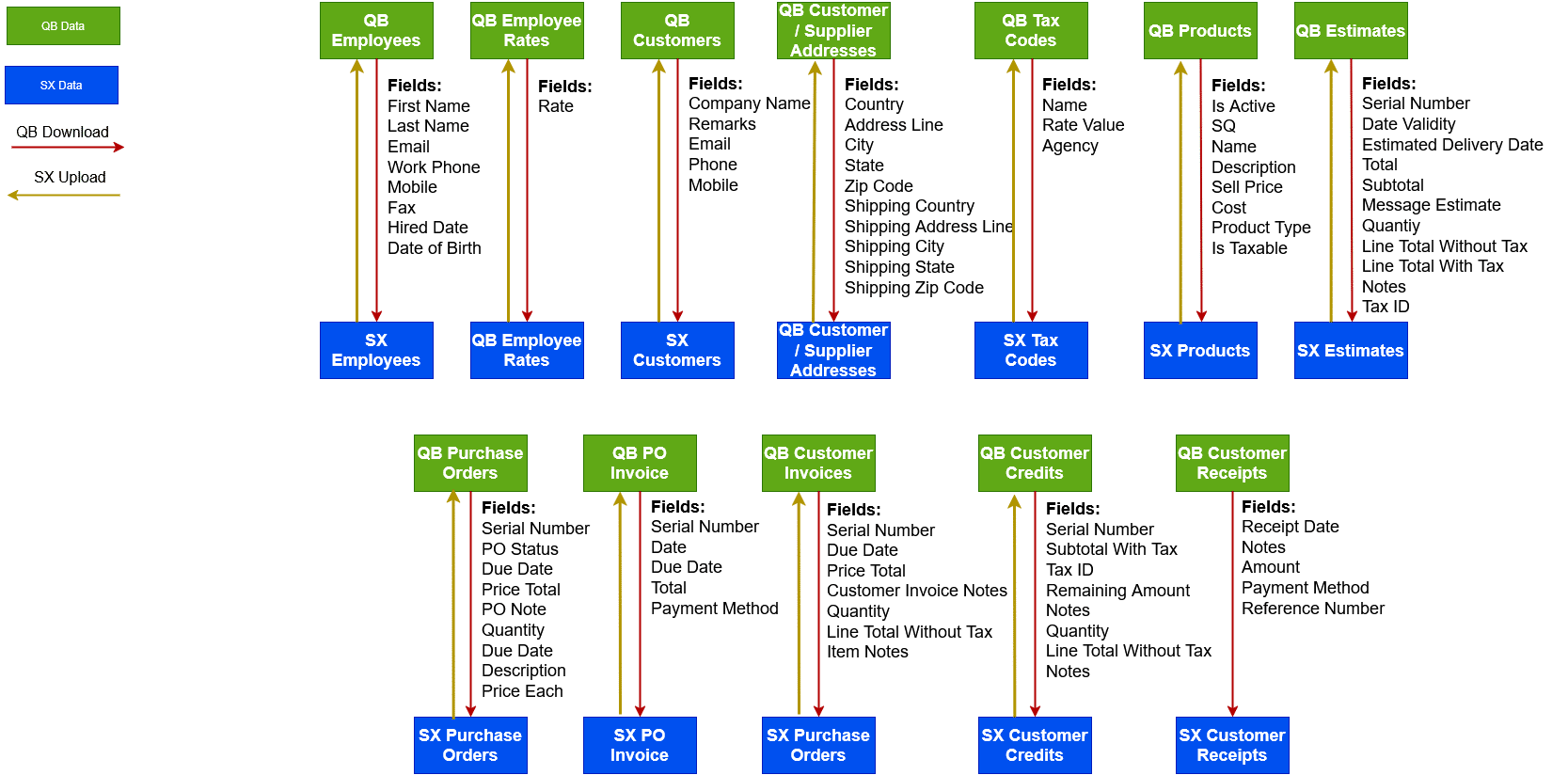
The integration starts by aligning essential records. After setup, ShopXpert becomes the operational system of record for new shop activity that must reach QuickBooks.
A one-time setup imports the essential historical and master data required to begin with aligned records and reduce duplication.
Once setup is complete, teams create new operational data in ShopXpert and synchronize the relevant records with QuickBooks.
A connected workflow helps operations and accounting teams work from consistent records while each platform continues to serve its core purpose.
Enter new operational data in ShopXpert and synchronize it into QuickBooks instead of repeating the same work.
Reduce duplicate records and keep production information aligned with the accounting workflow.
Add more operational data as the business grows without building disconnected manual processes.
Our team works with you through setup so the initial data alignment and ongoing workflow match your manufacturing operation.
The initial setup aligns essential records such as customers, suppliers, employees, products, and tax codes so the operational platform begins with a consistent foundation.
After the initial alignment, ShopXpert becomes the system of record for new operational information such as invoices, purchase orders, customers, suppliers, products, items, time entries, and job costs.
Yes. QuickBooks continues to support accounting functions, including financial activity such as payment receipts, while ShopXpert powers the day-to-day manufacturing workflow.
Yes. The ShopXpert team can help both new and existing customers plan and configure the integration.
Bring manufacturing operations and accounting into a clearer, more consistent workflow with implementation guidance from the ShopXpert team.